That's exactly why Professional Employer Organizations are no longer a niche option. They're now used by 14% of employers with 20 to 499 employees, and the reasons are straightforward: 2026 brings fresh compliance pressure. Mercer projects average employer health benefit costs will exceed $18,500 per employee this year — up 6.7% — while ADP has tracked 48 state-specific HR compliance changes for 2026 alone. For a small business without dedicated compliance staff, those aren't abstract risks. They're real financial exposure.
This guide covers what a PEO actually does, the five strongest options for small businesses in 2026, honest trade-offs on cost and co-employment, and how to avoid the selection mistakes that force expensive mid-contract switches.
Key Takeaways
- A PEO co-employs your staff to handle payroll, benefits, compliance, and HR admin while you retain full control of hiring, firing, and daily operations.
- The best PEOs for small businesses balance cost transparency, benefits access, and genuine compliance support.
- Pricing typically runs $40–$160 per employee per month or 2–12% of gross payroll — and most providers don't publish rates publicly.
- CPEO and ESAC certifications signal financial stability and tax compliance rigor — worth verifying before signing.
- Comparing multiple PEOs side-by-side with expert guidance is the most reliable way to find the right fit and avoid overpaying.
What Is a PEO and Why Small Businesses Are Turning to Them
A PEO enters a co-employment arrangement with your business. The PEO becomes the employer of record for administrative purposes — handling payroll taxes, benefits enrollment, workers' compensation, and HR compliance — while you retain full control over who you hire, what they do, and what you pay them.
The core value for small businesses is purchasing power. A 20-person company can't negotiate with health insurers the way a 20,000-person company can. PEOs pool employees across hundreds of client businesses and use that collective size to access group benefit rates that would otherwise be out of reach.
The results are measurable. According to NAPEO's 2024 white paper, PEO clients outperform comparable businesses across three key indicators:
| Metric | PEO Clients | Non-PEO Businesses |
|---|---|---|
| Employment growth rate | 4.3% | 1.9% |
| One-year non-survival rate | 4.98% | 7.50% |
| Annualized employee turnover | 50.4% | 57.6% |
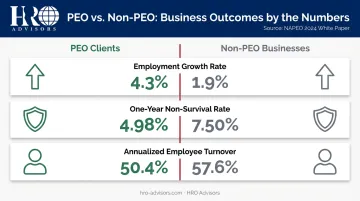
Those numbers reflect real operational advantages — which raises the practical question: does your business actually need a PEO?
When a PEO Makes Sense
A PEO is worth evaluating if your business is experiencing any of the following:
- HR administration is consuming significant staff time that should go toward revenue-generating work
- You're hiring across multiple states and struggling with varying tax, payroll, and labor law requirements
- You want to offer competitive health, dental, and retirement benefits but lack the purchasing power to do so affordably
- You're preparing to scale headcount quickly and need infrastructure that can keep up
If none of those apply — if you have a small, stable single-state workforce and your current HR setup is working — an ASO arrangement (administrative services without co-employment) or basic payroll software may be sufficient.
Best PEOs for Small Businesses in 2026
These five PEOs were selected based on small-business suitability, pricing transparency, service depth, and verified user feedback. Each covers a different primary strength — use the trade-offs and best-fit notes to narrow down which matches your business type, headcount, and biggest HR pressure point.
Justworks
Justworks is a New York-based PEO built specifically for small and growing businesses. Its published, per-employee pricing and 2-employee minimum make it one of the most accessible entry points into co-employment available.
Transparent pricing is rare in this space — most PEOs require a sales call before disclosing any numbers. Justworks publishes its rates publicly, offers scalable tiers, and packages compliance alerts, EPLI coverage, contractor payments, and multistate payroll into a clean, intuitive platform. Early-stage teams that need budget predictability before committing will find that structure unusually practical.
Trade-off: PEO Basic doesn't include health benefits, and advanced time tracking is a paid add-on.
| Details | |
|---|---|
| Pricing | PEO Basic at $79/employee/month; PEO Plus at $124/employee/month |
| Key Features | Multistate payroll, contractor payments, off-cycle pay, HR document management, compliance alerts, EPLI |
| Best For | Startups and small teams wanting transparent pricing and a scalable platform |
ADP TotalSource
ADP TotalSource is the PEO arm of ADP — one of the largest payroll and HR providers in the world. For small businesses that want human expertise on demand rather than self-service tools alone, this is the standout option.
The depth here is uncommon: dedicated certified HR Business Partners (HRBPs), bilingual MyLife Advisors for both employers and employees, harassment investigation units, workers' compensation specialists, and benefits/tax leave experts.
If your business faces a complex HR situation — termination disputes, workplace safety incidents, multi-jurisdiction benefits questions — TotalSource connects you with credentialed professionals rather than a help article.
Trade-off: Pricing requires a custom quote, and the platform complexity can feel like too much for very small teams.
| Details | |
|---|---|
| Pricing | Custom quote; no pricing published publicly |
| Key Features | Dedicated HR Business Partners, MyLife Advisors (bilingual), safety consultants, benefits administration, payroll, compliance |
| Best For | Small businesses that value on-demand HR expertise and advisor-led support |
Paychex PEO
Paychex brings decades of payroll processing depth to its PEO product. Its Taxpay service handles automatic tax administration, and its centralized Payroll Center dashboard gives employers clear visibility into payroll activity across their workforce.
For businesses in industries with significant workers' compensation exposure — construction, manufacturing, senior living — Paychex PEO is worth serious consideration. Its dedicated Safety Representative and workplace safety assessments are substantive features, not checkbox add-ons.
Trade-off: Time and attendance, recruiting, and employee engagement tools are sold separately.
| Details | |
|---|---|
| Pricing | Custom quote; no pricing published publicly |
| Key Features | Automated payroll and tax, benefits administration, safety assessments, compliance support, onboarding and offboarding |
| Best For | Small businesses with complex payroll needs or significant workers' compensation exposure |
Amplify PEO
Amplify PEO is a boutique-style provider with an unusually strong benefits offering. Employers can choose from six different medical benefit partners, and employees get access to a 24/7 Health Advocacy Concierge staffed by professional healthcare advocates.
That last feature is a real differentiator. Health advocacy services reduce HR workload directly — employees who need help navigating insurance claims, finding specialists, or understanding their coverage call the concierge rather than their manager. For small businesses where benefits questions land on a single person's desk, that's meaningful relief.
Trade-off: Integration options are limited compared to larger platforms, and technology depth doesn't match enterprise-tier competitors.
| Details | |
|---|---|
| Pricing | Custom quote; no pricing published publicly |
| Key Features | Choice of six medical benefit partners, 24/7 Health Advocacy Concierge, FSA, EAP, prescription drug programs, benefits strategy consulting |
| Best For | Small businesses prioritizing benefits quality and white-glove benefits support |
Rippling
Rippling combines a powerful HR and IT management platform with PEO services. Workflow Studio automates HR tasks that most PEOs require manual intervention to complete, and its workforce analytics give employers real-time visibility into people data that goes well beyond basic reporting.
For tech-forward businesses or teams scaling quickly, Rippling's breadth is a practical advantage. Volume-based benefits purchasing can reduce healthcare costs at scale, and the platform extends into device management and app provisioning — functions that matter for distributed teams.
Trade-off: Platform complexity may not be practical for very small teams, and pricing is quote-based rather than flat per-employee.
| Details | |
|---|---|
| Pricing | Quote-based; no flat pricing published |
| Key Features | Workflow automation, workforce analytics, EPLI, workers' compensation, benefits administration, payroll, IT management |
| Best For | Tech-forward small businesses or those scaling quickly that want automation and analytics alongside PEO services |
Pros, Cons & Costs of Using a PEO for a Small Business
Pros Worth Knowing
The headline benefit is benefits access. PEOs pool employees across client businesses to negotiate health, dental, vision, and retirement plans at group rates a 30-person team could never secure independently.
For firms with 10 to 49 employees, 52% of employees at PEO clients participate in a retirement plan versus 23% at non-PEO firms, according to NAPEO. That gap directly affects your ability to compete for talent against larger employers.
Beyond benefits, the operational advantages are real:
- Payroll and tax compliance handled under the PEO's EIN, reducing your administrative burden and compliance exposure
- Multi-state HR complexity managed by a provider built for it, rather than pieced together across multiple vendors
- Reduced liability through co-employment, including workers' comp coverage, EPLI, and proactive compliance monitoring
- Reclaimed time for founders and managers who no longer manage routine HR admin — NAPEO's ROI research estimates an average 27% return from cost savings alone
Cons and Limitations to Consider
Co-employment involves trade-offs worth being honest about:
- Standardized HR policies — Some business owners find that PEO systems apply uniform processes that don't always match their preferred approach. The PEO's compliance requirements govern certain procedures.
- Employee-facing changes — Employees may see a different entity's name on their paychecks or benefits communications. Clear internal communication before launch prevents confusion.
- Contract lock-in — Many PEOs require multi-year agreements with early termination fees. Read those terms carefully before signing.
- Hidden fees — Setup costs, SUI markups, benefits administration markups, and technology access fees can inflate your true cost well above an initial quote.
Practical tip: Always request an unbundled, itemized quote — not just a headline per-employee rate. Ask for a sample invoice, confirm what renewal rate increases look like in year two and three, and clarify exactly which services are and aren't included before you sign.
Understanding PEO Pricing
PEOs generally use one of two pricing structures:
- Per-employee per-month (PEPM) — A flat fee per employee, predictable and budget-friendly. The current industry range runs $40–$160 per employee per month, with most small-business-oriented PEOs in the $79–$125 range.
- Percentage of gross payroll — Typically 2–12% of total payroll. Can be cost-effective for businesses with seasonal staffing but harder to budget consistently.
Only a handful of PEOs publish pricing publicly — Justworks being the most notable example in this list. Most require a custom quote, which makes true cost comparison difficult without a structured process. That's where working with a broker like HRO Advisors can help: a side-by-side comparison across multiple providers cuts through the opacity and surfaces the actual all-in cost before you commit.
How We Selected These PEOs for Small Businesses
These five providers were evaluated across eight dimensions:
- Employee minimums and scalability
- Pricing transparency and contract terms
- Ease of onboarding
- Payroll depth and tax compliance
- Benefits quality and carrier access
- Compliance coverage (CPEO and ESAC certifications)
- Customer support quality
- Verified user reviews from G2 and Forbes Advisor
A Note on Certifications
Two certifications matter when vetting a PEO:
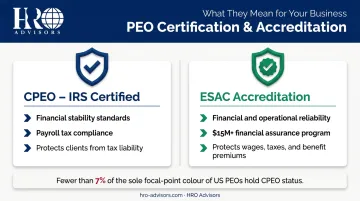
- CPEO (Certified Professional Employer Organization) — IRS-certified status meaning the PEO meets standards for financial stability, background checks, and payroll tax compliance. Critically, CPEO clients are protected from certain tax liabilities that would otherwise fall back on them if the PEO fails to remit taxes. Fewer than 7% of US PEOs hold this certification.
- ESAC Accreditation — Verifies a PEO's financial and operational reliability. ESAC's financial assurance program exceeds $15M and protects accredited PEO clients for payment of wages, payroll taxes, and benefit premiums.
A common mistake: choosing a PEO based on brand name or lowest initial quote without verifying these certifications. An uncertified PEO that fails to remit payroll taxes can leave your business liable — a risk that's easy to eliminate by simply checking the IRS CPEO public roster and ESAC's accredited member list before signing.
Why Working With a Broker Simplifies This
Evaluating five or more PEOs independently takes weeks. Collecting custom quotes, reviewing contracts, comparing benefits structures, and verifying certifications requires expertise most small businesses don't have in-house.
HRO Advisors, a PEO broker based in Dallas, Texas, compares up to 8 providers side-by-side for small businesses at no cost to the client. Their three-step process covers needs assessment, cost and coverage analysis, and direct provider negotiation — typically wrapping up in under two weeks. Clients frequently report savings of up to 40% on HR costs as a result of the negotiation step alone. HRO Advisors is compensated by the provider selected, so there's no invoice to the business at any stage.
Conclusion
The best PEO for your business isn't the most recognized brand or the one with the longest features list. It's the one that fits your team size, budget, compliance needs, and growth trajectory — and holds up on service quality at renewal, not just at contract signing.
PEOs are long-term partnerships. Switching mid-contract is expensive and disruptive, so getting the selection right upfront matters more than most owners expect.
If you want to skip the guesswork, HRO Advisors offers a free, no-obligation PEO comparison covering up to 8 providers side-by-side, with expert guidance and direct negotiation on your behalf — at zero cost to your business. Reach their team at 866-755-0288, info@hro-advisors.com, or schedule a 15-minute introductory call to get started.
Frequently Asked Questions
How much does a PEO typically cost?
Most PEOs charge $40–$160 per employee per month or 2–12% of gross payroll, depending on the pricing model. Very few providers publish rates publicly — most require a custom quote. Always request itemized quotes and ask about renewal escalation terms before comparing options.
Which is better for small businesses, a PEO or an EOR?
A PEO is typically the right choice if you already have US-based employees and want to co-employ them for HR, payroll, and benefits administration. An EOR is used when hiring workers in states or countries where your business doesn't have a legal entity — making it the better fit for international or cross-border hiring situations.
What is co-employment and does it affect my control over employees?
Co-employment means shared administrative responsibility — the PEO handles tax filings, benefits, and compliance as employer of record, while you retain full control over hiring, firing, compensation decisions, and day-to-day management. Your employees still report to you.
What is a CPEO and why does it matter?
A Certified Professional Employer Organization has met IRS standards for financial stability, background checks, and payroll tax compliance. Clients of CPEOs are protected from certain tax liabilities that could otherwise fall back on them if the PEO fails to remit payroll taxes. Verify CPEO status directly on the IRS website before signing any contract.
How long does it take to onboard with a PEO?
The pre-contract and benefits selection phase typically takes one to two weeks. Full system setup and employee onboarding takes two to eight weeks, depending on business complexity, number of states, and how prepared you are with payroll history, tax IDs, and employee census data.
Can a small business with fewer than 10 employees use a PEO?
Yes. Many PEOs — including Justworks, which requires just two employees — are specifically designed for very small teams. In fact, small businesses often see the greatest proportional benefit from PEOs because the cost savings on benefits and compliance support are largest relative to team size.